A useful step in basic computer maintenance is “taking out the trash” — removing deleted data from your system permanently. Some people forget that when you delete a file it is not gone for good. It merely gets relocated to the Recycle Bin. The Recycle Bin then needs to be emptied for the files to be gone for good. Having 2, 3, or 5+ GB of deleted files sitting in your Recycle Bin adds to clutter on your system and can potentially affect the performance of your hard disk drive and your entire computer.
Removing Deleted Files
Easiest way to empty the Recycle Bin is to locate the Icon on your Windows Desktop. It looks like this:

Right-click on the Recycle Bin and a Menu will appear looking like this:
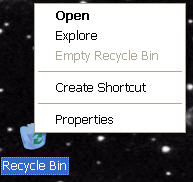
Select “Empty recycle bin” from the menu. This will remove all deleted files and premanently delete them. If the “Empty recycle bin” item is grayed out like in this image it means that the Recycle Bin is already empty.
