Craigslist Reader is no longer available. There web site displays the following message, “At this time, we are no longer able to offer our valued customers the Craigslist Reader Searching Tool. Don’t fret though because we are the House of Finders. Our job is to connect you with timesaving, moneysaving, and moneymaking tools.” Those links look pretty spammy and are not recommended.
CraigsList Reader Empower Users to Search Craigslist
Craigslist.org provides a wealth of information through free online classified ads and postings for over 500 US cities and over 50 countries. It is one of the most heavily traveled sites on the web but a visitor’s ability to effectively search Craigslist classifieds is limited. A great search tip to simplify the Craigslist search process is to use the free CraigsList Reader, search tool for efficiently wading through the vast amount of information in the Craigslist listings. Also be sure to check out the post on “Search Craiglist Classified Ads – 7 Tools for Faster Searching.”
Update: The former free version of CraigsList Reader is now a seven-day free trial as of Fall 2009. After the seventh day you need to purchase the product or it expires.
Created by Motion Technologies, CraigsList Reader uses an interface that looks similar to Microsoft Office 2007 and allows users to deep search Craigslist over multiple geographic locations, multiple categories, subcategories, and even price range at the same time. CraigsList Reader search criteria can also be narrowed by the date range of the listings to be displayed – from within 1 day to within 30 days. A search of Craigs list using multiple locations is shown below.
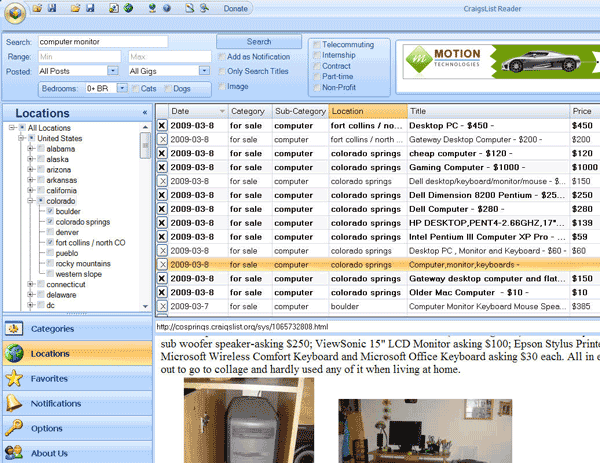
CraigsList Reader allows for searching by all the same categories, subcategories and locations as the Craigslist.org web site while also providing ongoing notifications of new listings that fit your search criteria. Search notification can be made by email or by receiving an onscreen notification. You need to keep the CraigsList Reader search tool running and minimized to receive the notifications. You can manually set the time interval for checking for new listings.
Fine Tuning CraigsList Reader Settings
After downloading and installing CraigsList Reader there are a few settings you will want to fine tune based on the speed of your Internet connection and how you will be using the search tool. The Options Screen shown below allows you to control the maximum number of threads or connections. More threads will improve performance with a faster broadband Internet connection.
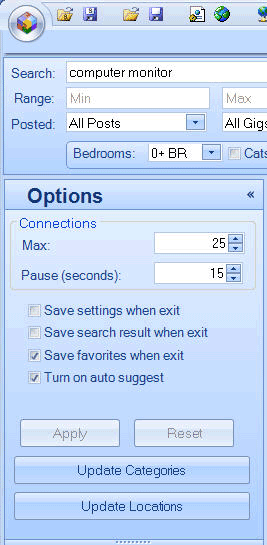
Following the initial installation of the CraigsList Reader search tool you may need to update the “Categories” and “Locations” to ensure that you have all the most current data. There is an Update Categories button and an Update Locations button on the Option menu. Be aware that each of these update processes can take 15 – 30 minutes to complete depending on your connection speed and computer speed but running these updates once will ensure accuracy of the Craigs List Reader listings.
Craigslist Reader Video from Motion Technologies
Here is a YouTube video from Motion Technologies which touch on some of the functionality of Craigslist Reader.
CraigsList Reader is an excellent tool for efficiently accessing, searching and monitoring the listings on Craigslist. There is a small learning curve and not every feature is intuitive, but it delivers a well designed interface that works smoothly. There is minimal documentation, but that is not significant drawback and this is a free program after all. If you use Craigslist with any frequency it would be well worth investing a little time to master the CraigsList Reader search tool and save time with your searching. And remember to check out my post on “Search Craiglist Classified Ads – 7 Tools for Faster Searching.”
