People or businesses looking for a Voice Over IP (VoIP) solution should make Skype one of the options they consider. Offering a wide range of features, the last few years has seen Skype also become increasingly popular with people who need to make international calls but want a more cost effective solution. Skype has a very broad customer base and people use the service in many different ways. This article will introduce you to 15 useful things to know about Skype that you may not have been aware of.
Some customers choose Skype for VoIP services including voice and video (webcam) only. Others use Skype principally for text-based chat purposes with its wide range of features. Other customers do “Skyping” that takes advantage of the full range of services offered by Skype.
Part of what’s handy about this program is its versatility. There is no single best approach to how to use Skype. It all comes down to your needs. Here are 15 useful tips to get you started if you’re interested in downloading the program.
- Getting Skype: To start with, you can download the current version of Skype here. The program runs on Windows, Mac, Linux or Mobile phone (Skype mobile runs on Verizon, Android, iPhone, iPad, Symbian and other systems). Even some televisions are compatible with Skype.
- Skype Phones: One thing which deters some people from trying out Skype in place of a home phone is the fact that it’s an “internet phone.” This doesn’t mean you have to be chained to your desk talking through a microphone or headset, though. You can purchase a cordless Skype phone or an adapter for your home phone on Skype’s website.
- Phone Compatibility: the Skype cordless Wi-Fi Phone is not compatible with random hotspots, since there is no way to log in to them. A Skype cordless phone is not the same thing as a Skype cell phone.
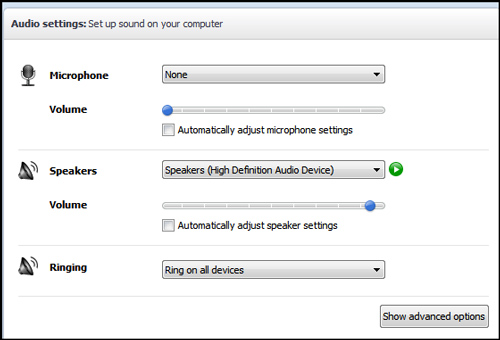
- Audio Settings. If you download Skype to use for voice calls, don’t neglect the Audio Settings tab. Skype can get a little buggy with this; sometimes the program will change your audio output or microphone input settings on you without notifying you. This is the first place to check if you can’t hear or if someone else can’t hear you. It’s a key step in Skyping.
- Skype-to-Skype calls are free: This means you can talk to any other Skype user without paying for a subscription or a call. There are many competing services which also offer free voice and video calls, so this is a convenient, but not unique, feature.
- Skype rates are really cheap: For just $3.00 a month you can purchase an unlimited calling plan. Voicemail comes along with the plan, and you can call actual land line phones this way.
- Home Phone Replacement: Want to actually replace your home phone? You’ll also need to rent a phone number so people can call you with their phones. This also comes out to about $3.00 a month, so you can get a fully functional phone plan for about $6.00 a month. The drawback? Skype isn’t compatible with most cell phones (plus you’d still be stuck paying for a basic cell phone plan). However, if you have any of the compatible mobile devices listed, you can get cheap mobile calling this way, too.
- No Emergency Calls: One way in which Skype cannot replace a standard phone line is for emergency calling. Skype does not support emergency calling and has no plans to do so in the future.
- Call Forwarding: One way to use Skype in conjunction with a cell phone is to use call forwarding where you can forward all Skype calls to your cell phone number. This doesn’t let you place outgoing calls from your cell phone over Skype (or stop paying for your cell plan), but it does forward other peoples’ Skype calls to you to your cell phone at no charge to them. The service costs you only a few cents per minute if you’re in the US.
- Displaying Contacts: If your contact list gets cluttered, you can look under “Contacts” and then select “Hide Contacts Who Are Offline.”
- Adding Contacts Quickly: The “Import Contacts” feature is a good way of finding all your friends and associates on Skype quickly. This will import contacts from your address books in Facebook, Microsoft Outlook and other sources.
- Privacy Control: Skype’s privacy settings are a great way to take control over who can contact you and who can’t. You can cut down on spam by selecting “Only allow people in my Contact list to contact me.” A white list is a much cleaner solution than a black list. This isn’t the best choice though if Skype is your main phone line.
- Contact Groups: Rename your contacts and organize them into groups to easily keep track. Skype has a lot of users, so your list could get crowded and confusing fast.
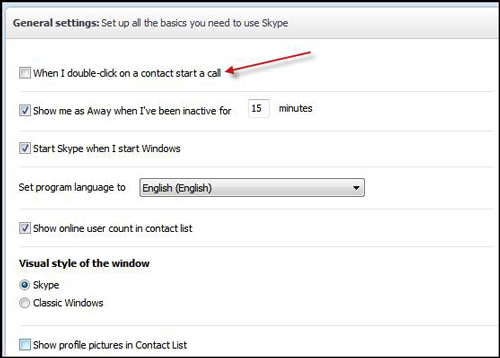
- Accidental Calls: Do you keep accidentally calling people on your Skype list? It’s probably because you haven’t unchecked the box in your General Settings which says, “When I double-click on a contact start a call.”
- Podcasts on Skype: You can actually use Skype to record high quality podcasts with guests from around the globe if you also download a (free) program like Audacity to handle the recording end. It’s not the most common use for Skype to be sure, but it’s a creative one.
Skype provides a wide range of web-based services including voice and video calling, free Skype calls, group video calling, voice mail and call forwarding as well as feature-rich instant messaging. The program has  both free users and paid subscribers. Competitors include Google Talk, Empathy, Linphone, Facetime and Ekiga, among others. Some of these competitors are more focused on instant messaging while others are mainly telephony companies.
These tips should help you in determining if Skype might be useful for you at home or at the office and how to get started skyping. Since Skype is such a versatile application, you may end up using it as your main VOIP utility or you may just decide to use it occasionally to supplement your existing methods of communication. Don’t forget to check into Google Talk, Empathy and other similar programs as well.